The Ecommerce Search Audit: A Step-by-Step Framework
A complete self-audit framework for ecommerce search performance — the same diagnostic SearchSense uses when onboarding new Commerce customers. Work through each step with your own data.
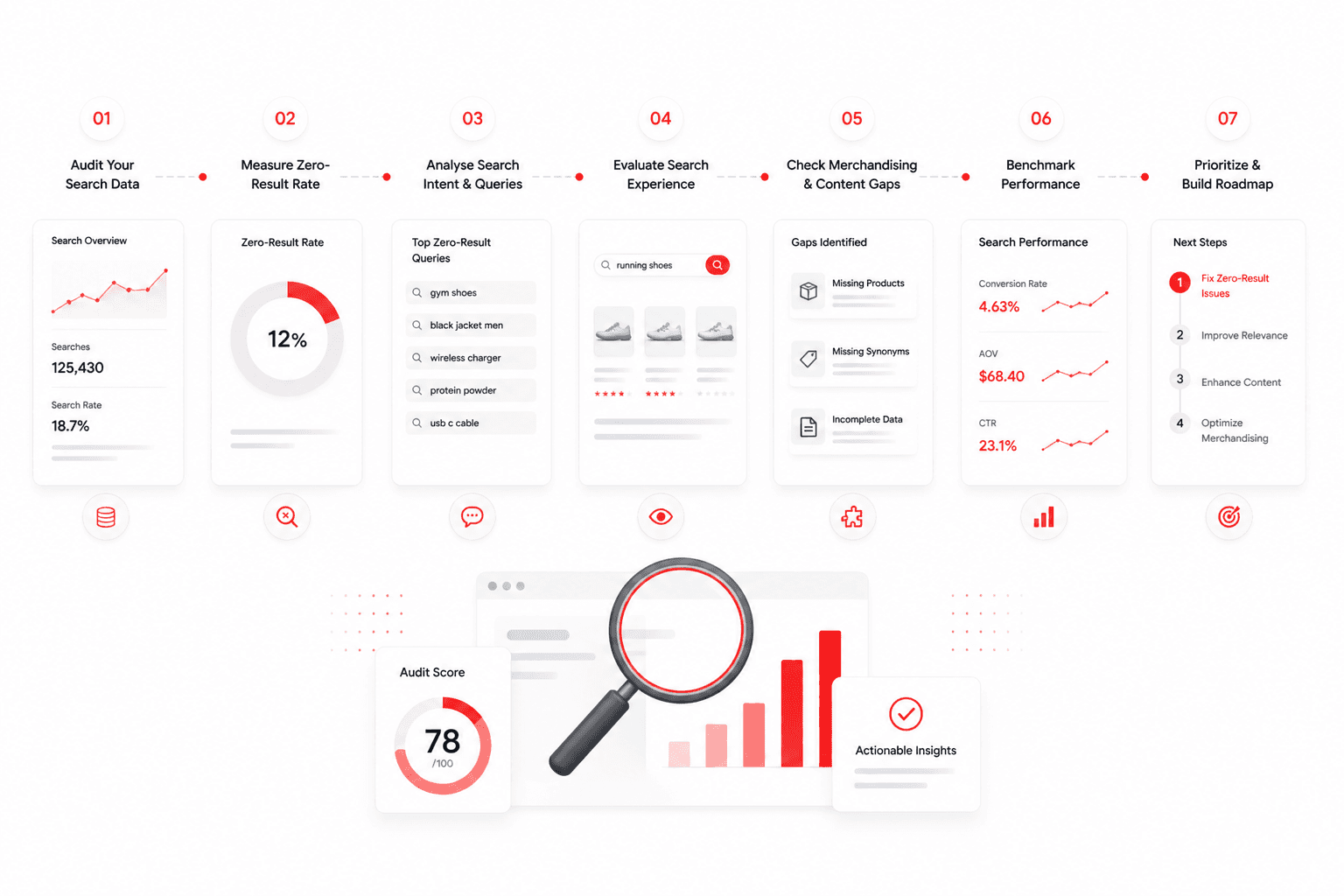
This guide walks you through a complete self-audit of your ecommerce search performance — the same diagnostic framework SearchSense uses when onboarding new Commerce customers. Work through each step with your own data and you will have a clear picture of exactly where your search is losing revenue, which failure modes are most severe, and what to fix first.
What you need to complete this audit
Access to your analytics platform (GA4, Shopify Analytics, or your search tool's dashboard) · Approximately 45 minutes · A spreadsheet to record findings
Step 1: Find your zero-result rate
Your zero-result rate is the percentage of searches on your store that return no results. It is the most direct measure of search failure. If you do not know this number, finding it is the first priority.
How to find it
In Google Analytics 4: navigate to Explore → create a Free Form exploration. Add 'Search Term' as a dimension and 'Sessions with search' as a metric. Export the full list of search terms. Cross-reference against your product catalog to identify terms with no matching products.
In Shopify: go to Analytics → Search. Shopify shows top search terms and their click-through to products. Terms with zero product clicks are zero-result candidates.
In your search platform: look for a 'Zero results' or 'No results queries' report in your search analytics dashboard.
Benchmarks
| Under 3% | Excellent. Your search vocabulary is well-matched to how shoppers search. |
| 3–7% | Industry average. Addressable with synonym rules and semantic search. |
| 7–15% | High. Significant revenue leaking. Immediate action warranted. |
| Above 15% | Critical. Search is a material revenue problem, not an optimisation opportunity. |
Step 2: Audit your top 20 zero-result queries
Take the 20 highest-volume queries that returned no results. For each one, determine which failure mode it represents.
| Vocabulary gap | Query describes a product you carry using different words. Fixable with semantic search or synonym rules. |
| Catalog gap | Query describes a product you genuinely don't stock. Not a search problem — a ranging decision. |
| Spelling/typo failure | Query contains a misspelling your search engine doesn't handle. Fixable with fuzzy matching. |
| Attribute search failure | Query includes specs your search engine doesn't index (colour, material, size). |
| Brand misspelling | Customer misspelled a brand name. Fixable with brand synonym rules. |
For most mid-market stores, 60–75% of zero-result queries are vocabulary gap failures. These are the ones semantic AI search addresses directly — no manual synonym work required.
Step 3: Test your synonym and intent coverage
Run the following 10 test queries on your store. Note whether each returns relevant results.
| Test 1 | Search for a product category using informal language. ('Comfy shoes' not 'trainers') |
| Test 2 | Search for a product by its use case rather than its name. ('For the gym' not 'gym wear') |
| Test 3 | Search with a common misspelling of your top brand. |
| Test 4 | Search for a product using a synonym not in any product title. ('Parka' if you sell 'padded jackets') |
| Test 5 | Search using a colour description not in product titles. ('Dark navy' if titles say 'navy') |
| Test 6 | Search for a product by material. ('Merino' or '100% cotton') |
| Test 7 | Search for a product occasion. ('Wedding guest dress' or 'office shoes') |
| Test 8 | Search with a number in a different format. ('Size 10' vs 'UK 10') |
| Test 9 | Search for a product by its problem. ('Waterproof' as a query on its own) |
| Test 10 | Search using an American spelling if you are a UK store, or vice versa. |
Score your results: 8–10 relevant returns = good coverage; 5–7 = moderate gaps; below 5 = significant vocabulary coverage failure.
Step 4: Assess your merchandising independence
Answer these five questions honestly. Each 'No' represents a revenue risk created by developer dependency in your search configuration.
| Can your team pin a product to the top of search results without a dev ticket? | Yes / No |
| Can your team schedule a campaign with a defined start and end date? | Yes / No |
| Can your team add a synonym rule without engineering? | Yes / No |
| Can your team create a search redirect without code? | Yes / No |
| Can your team view which search queries are driving revenue vs which are not? | Yes / No |
Step 5: Check your search analytics instrumentation
Search analytics is the instrument panel for your search performance. Without it, you are optimising blind.
| Zero-result queries | The foundation. Without this, you cannot address vocabulary gaps systematically. |
| Search conversion rate | The comparison between search-initiated sessions and browse sessions. |
| Revenue attribution by search query | Which queries are driving orders. Focuses optimisation on highest-value queries. |
| Click-through rate by result position | Whether the top result for each query is the right one. |
| Search refinement rate | How often shoppers add filters after an initial search — a signal of initial result quality. |
Interpreting your audit results
| Zero-result rate above 7% | Immediate. Semantic AI or comprehensive synonym rules. Highest revenue impact. |
| 3+ failed synonym/intent tests | High. Vocabulary coverage is inadequate. Addressable with semantic search. |
| 3+ No in merchandising | High. Operational efficiency and campaign velocity at risk. |
| Fewer than 3 analytics points | Medium. Without instrumentation, all other improvements are unmeasurable. |
| Zero-result rate 3–7% | Optimisation. Steady improvement through semantic AI and ongoing gap closure. |
→ Run the automated SearchSense Commerce audit — your results in under 2 minutes